BlogArticles
Common Data Environment Explained Simply
29 Oct 2026 · Maks, architect and BIM manager. 10+ years on architectural projects, including 30 project SharePoint sites.
What a common data environment is, who should run it - all explained as simply as humanly possible.
Except it is not simple, and that is the problem.
I have been working on architectural projects for 10+ years as an architect and BIM manager, pioneering project-specific SharePoint sites. We run over 30 project SharePoint sites for large projects. This post is for architects, lead designers, project managers and anyone who has been asked to "upload it to CDE" and wondered - which one? This is an attempt to bring some clarity to the terminology that gets used constantly, but does everyone agree what it means?
What a CDE actually is?
- common = shared
- data = any project document or file
- environment = digital platform that supports the CDE principles
How does ISO 19650 describe it?
ISO 19650 description of a Common Data Environment (CDE):
A common data environment (CDE) is described as a combination of technical solutions and process workflows used to manage information containers that are developed and exchanged throughout the life of a project.
ISO 19650-2 envisages a "project CDE" provided and managed by the appointing party (or a third party on their behalf) for managing all information containers exchanged with the appointing party. Delivery teams may also implement their own distributed CDEs, but not instead of the project CDE.
Reference: https://ukbimframework.org/wp-content/uploads/2020/05/ISO19650-2Edition4.pdf
To simplify, a CDE is any shared repository where everyone on a project can access and share project information. That means drawings and documents, but in principle any type of information. Here we need to consider two branches: documents and BIM models. Do not get confused, these might be separate platforms, but all can be considered a "CDE" in their own right. For simplicity, we will focus on documents in this blog.
So a shared folder on OneDrive can be a CDE. A SharePoint site is a CDE. Platforms like Procore or Forma Data Management (formerly Autodesk Docs) are CDEs. There are quite a few of them on the market.
ShareLog, our own platform for file sharing with QA register, is currently undergoing a major upgrade to support "shared repository" and therefore become a CDE platform.
The definition is simple. Choosing and running one platform is not.
What decides which CDE to use?
Five checks: who runs it, what it is for, which RIBA stage, what it costs per person, and how hard it is to set up.
Before picking and implementing any platform, I would look at the following:
Who should run the project CDE?
ISO 19650-2 expects the appointing party, or a third party on their behalf, to provide the project CDE. On live jobs it is often the lead designer early, and the contractor after appointment.
And the answer isn't always project owners! It can be the lead designer, the client, the contractor or maybe the project manager.
Purpose
What is the primary purpose, considering the project timeline? This might sound silly, as we already described what a CDE is for, but ask the questions:
- Is it for collaboration between the project design team?
- Is it for client and project stakeholder engagement and approvals?
- Is it for precisely controlled information flow and QA?
- BIM model collaboration and federation? (Let's exclude BIM models from this discussion for clarity, it is messy as is.)
If the answer is all of the above, then that is the complexity we are facing, because there is no one-size-fits-all solution (well, maybe a market gap that we will explore at Systemais).
When in the project is it used? Timeline
The easiest way to express this is through RIBA stages. Different platforms and workflows serve different purposes at different stages.
What does it cost per person and who pays? Cost
This one is critical, and it quietly decides more than people admit. Picking the wrong CDE for the wrong purpose can be a very costly mistake.
Is the setup and onboarding complicated, or is it log in, set up and use? Setup
Large, well-established providers will likely require complex onboarding and long-term commitments. (This is another market opportunity that we will explore at Systemais.)
Who are the project stakeholders, and how will they access the CDE?
Important: statutory responsibility. Having a CDE might not be optional.
📘 Building Safety Act 2022 – Key Duties
Section 33, Schedule 1, Paragraph 1D – Keeping and giving information
"Building regulations may… make provision about obtaining, keeping and giving information and documents… including requirements as regards keeping information or documents up to date."
Building Safety Act 2022, Section 33, Schedule 1 (see Paragraph 1D)
For this post I am focusing on larger projects with many stakeholders. On a small job most one shared folder should do the sufficient.
Which CDE should a design team use at RIBA stages 1 to 3?
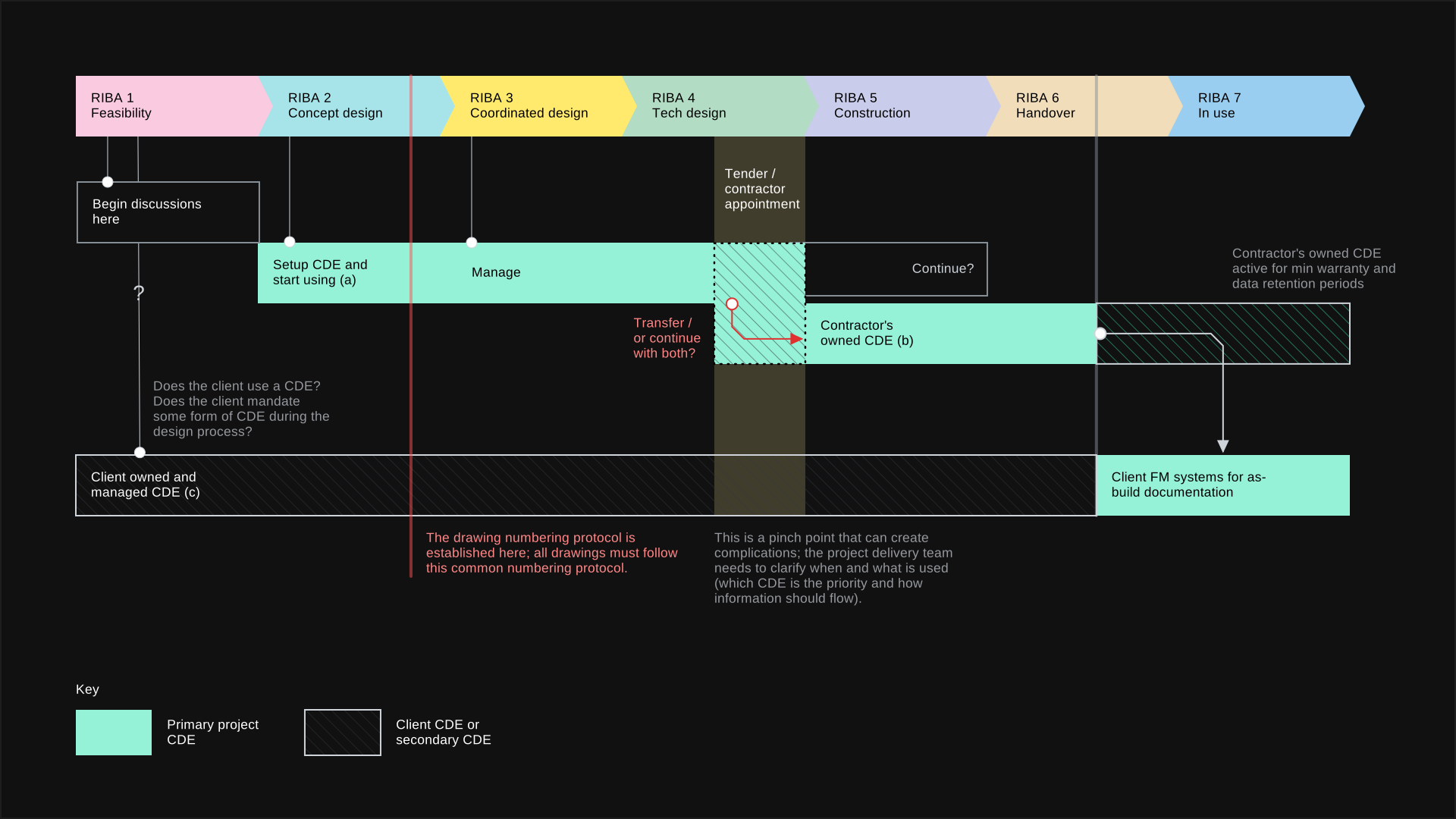
At RIBA 1 to 3 a formal CDE often does not exist yet. A project SharePoint site is usually the right tool, because the work is fast-changing design WIP, not controlled submittals.
At the early stages the contractor is nowhere near appointed and the tender is a long way off.
What usually happens is one of two things. Either a proactive lead designer or project manager introduces some sort of shared repository to help collaboration, or the client's requirements state that a CDE is needed.
At these stages the focus is design. It is not submittals, approvals or precise control of information flow. It is dynamic information exchange: sketches going back and forth, consultants dropping in markups, half-finished options being compared. Everything is changing fast here and everything is WIP for coordination.
This is why robust QA platforms fail here, and ISO also fails to be effective.
But the biggest mistake a design team can make is to have no common collaborative environment at this stage. Failing to establish common drawing naming protocols leads to very poor information sharing, and that has a negative impact on how the project develops. Delivery timelines keep getting shorter, and we simply cannot afford this.
What happens to the CDE when the contractor is appointed?
From RIBA 4 to 5 the contractor's CDE takes over document control: naming, status codes, revisions, and transmittals.
When the contractor is appointed, the volume of information changes. There are a large number of suppliers, standard documentation and constant design changes. Almost every large contractor has its own CDE or platform implemented at organisation level, and at this point they take full control.
The design team, usually now novated, uploads information into the contractor's CDE in a very particular way. Naming, status codes, revisions, transmittals: all document control is fully managed by the contractor.
The big disadvantage is that these systems are very stringent. There is no flexibility. They are built specifically for controlled document exchange, and by their nature they offer very little collaboration.
That is not a criticism of the contractor. At construction stage, control is the point. It just means the design conversation has to happen somewhere else.
But regardless of the contractor's CDE, they will normally have dedicated document controllers.
What if the client already has a CDE?
A client CDE is a submission and audit point. It is not a workspace for the design team.
There is a second scenario before the contractor is appointed. Large clients that run multiple capital projects at the same time often have their own CDE. For them it is quite critical to manage all incoming design documentation in-house. QA and data flow audit are the priority here.
In this case the client manages the platform and controls distribution across their own organisation. The design team is simply required to upload documentation to a single location.
What you probably will not get is any collaboration between design team members inside that environment.
How does information move between design, client, and contractor CDEs?
In design, the team collaborates in its own CDE and uploads the same issue to the client CDE. In construction, the novated team uploads to the contractor's CDE, and the contractor's document controller uploads to the client.
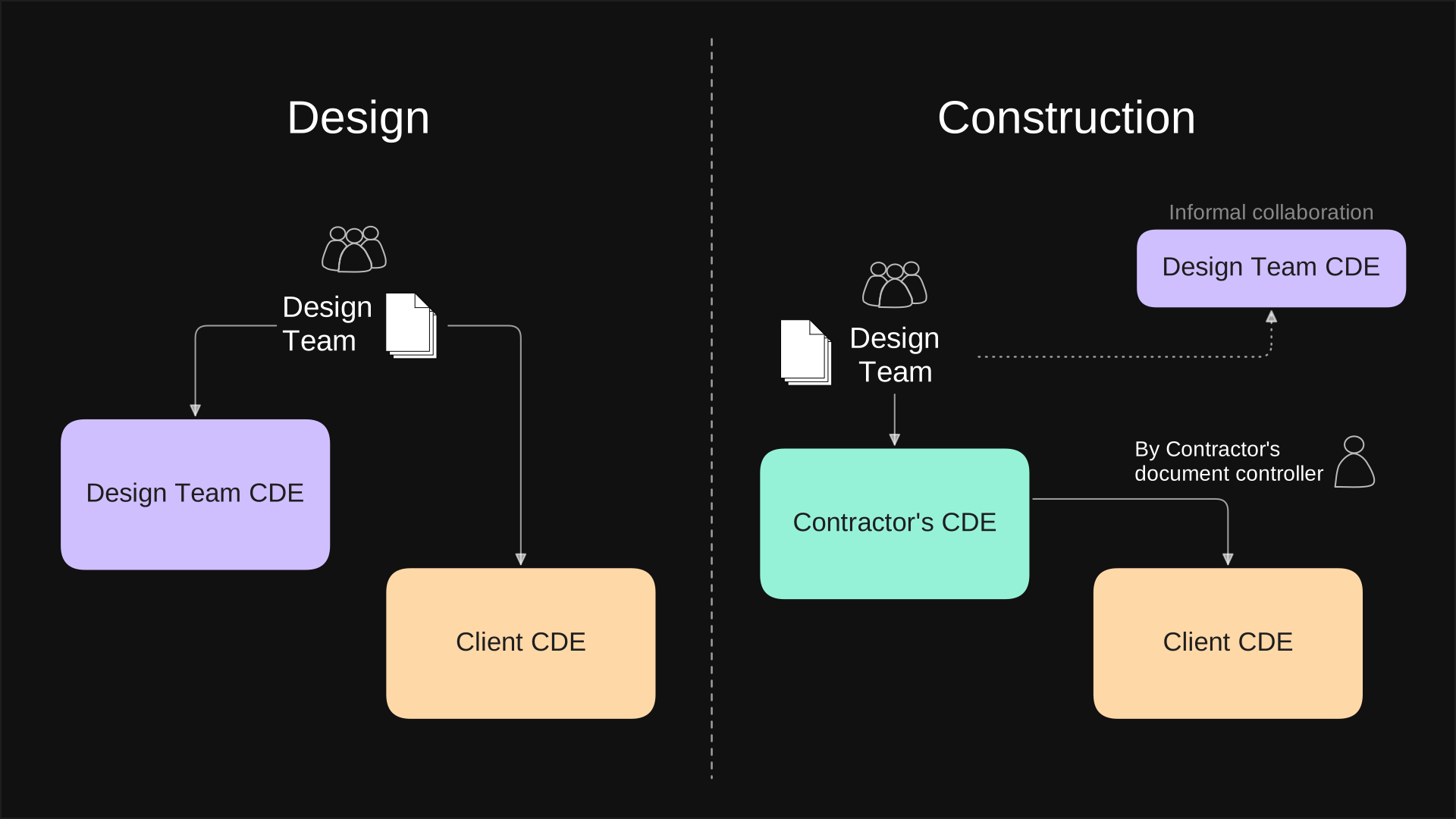
The information flow 'design stage' vs 'construction stage' on a typical large project. Diagram: Maks / Systemais
Design stages
In the early design stages the design team shares information primarily through its own CDE. That environment is for collaboration. If the client has a CDE, the same information is uploaded to both places: the design team CDE for collaboration, and the client CDE for approvals and the audit trail.
Construction stages
During construction, provided the design team is novated to the contractor, all information flows through the contractor's CDE. Follow-up uploads to the client CDE are managed by the contractor's document controllers.
The design team's CDE can remain active. It becomes the informal collaboration environment, alongside the contractor's document control.
Common mistakes
- Failing to establish a common collaborative environment during the design stages can lead to very poor information sharing, and that has a negative impact on how the project develops. Delivery timelines keep getting shorter, and we simply cannot afford this.
- If the client has a dedicated CDE, as a designer never agree to handle two CDEs during the construction stage. Always consider contractual relationships. If novated, upload to the contractor's CDE. It is the contractor's responsibility to manage information exchange with the client.
- Always review upload procedures and your responsibility.
- Never agree to use a CDE without considering the costs to your practice. Typically all costs should be covered by the CDE "owner".
- Avoid changing drawing numbers, and pre-agree drawing naming protocols before any initial uploads.
- If you are a client with many stakeholders commissioning a larger project, not having a CDE is a major problem. As a minimum you can request that the design team provide one during the design stage, as a requirement under your EIRs (Employer's Information Requirements).
- Failing to establish common drawing naming protocols. If you change drawing numbers between tender documentation and construction, trouble is guaranteed. A typical mistake is that common drawing number protocols are not established on time.
Table 1: Platforms by RIBA stage
Notes:
- RIBA 1 to 3 cells come from the post text. RIBA 4 to 5 cells are an interpretation of the "contractor appointment" section, so check them.
- RIBA 6 and 7 are not covered in the post. The shared folder row is marked not suitable. SharePoint is not suitable in general unless there is additional custom development. Purpose-built platforms and the proposed FM platform are marked handover of as-built information at RIBA 6. The proposed FM platform is used for facility management at RIBA 7. Purpose-built platforms at RIBA 7 keep information for the minimum period set by the organisation retention policy.
Table 2: Platforms, pros and cons
| Platform | Collaboration | Controlled information flow and QA | Costs | Setup and management | Access for users |
|---|---|---|---|---|---|
| OneDrive folder RIBA 1 to 2, small jobs | Simple and quick to share, and easy to invite people. Gets messy fast. | None. Relies on discipline, with no approval process. | Included in the M365 licence, storage included. Strong value. | Locked out with a user OneDrive account. No central practice access. | Anyone can be invited. Permissions get untidy. |
| SharePoint site (project specific) RIBA 1 to 3, usually the right trade | Flexible for fast-changing design WIP. Clients and stakeholders can be given access.. | No established QA, workflow or approvals. A real gap. | Setup, then very little (M365 Business Basic or above). Storage comes out of the organisation pool (1 TB default). Strong value. | Quick to start. Someone must set up and police structure, permissions and naming. | No per-seat purchase beyond M365. External users. |
| Autodesk Forma RIBA 3 to 4, design team and BIM only | Collaborative for BIM workflows. | A controlled environment. | Very expensive. Unfeasible for large multidisciplinary teams because of the cost per licence. | Complex onboarding and a long-term commitment. Requires an in-house BIM and information manager. | A licence per person. PM, acousticians, client reps and other stakeholders may get none. |
| Purpose-built third party (4P, Aconex, Dalux, WebbSpace, many others) RIBA 4 to 5 onwards, usually the contractor's | Very little day-to-day collaboration. Built for transmittals. BIM support varies by platform. | Strongest control: naming, status codes, revisions, transmittals and approvals. | Unknown, and a long commitment is likely. Storage is usually unlimited. | Complex. Usually run by dedicated document controllers. | Set by the owner (contractor or client), at a per-seat cost. |
| ShareLog RIBA 1 to 6 | No shared repository yet; coming in the next update. | File sharing with a QA register. | Very cost effective. | Made to be simple. | No complex onboarding, with simple access and no additional cost per user. |
What can an architect use as a CDE today?
Use a shared folder only on a small job, a project SharePoint site for RIBA 1 to 3, and a purpose-built platform once the contractor or client is controlling issue and approval.
Throughout this article we have seen that there are multiple platforms doing different jobs, at different stages, for different purposes. There is no single solution that suits everyone. I will keep developing ShareLog to explore these gaps and build something more suitable. In the meantime, you still need something that works today.
This is an overview of the options I have worked with and used myself. There are others on the market.
Option 1: Shared folder.
You can go as simple as a shared OneDrive folder. But this will get messy very quickly. Not suitable for larger projects. It is also linked to personal OneDrive account and cannot be effectively managed by the practice. Therefore shared folder is better than nothing, but it is not a good solution.
Option 2: SharePoint site
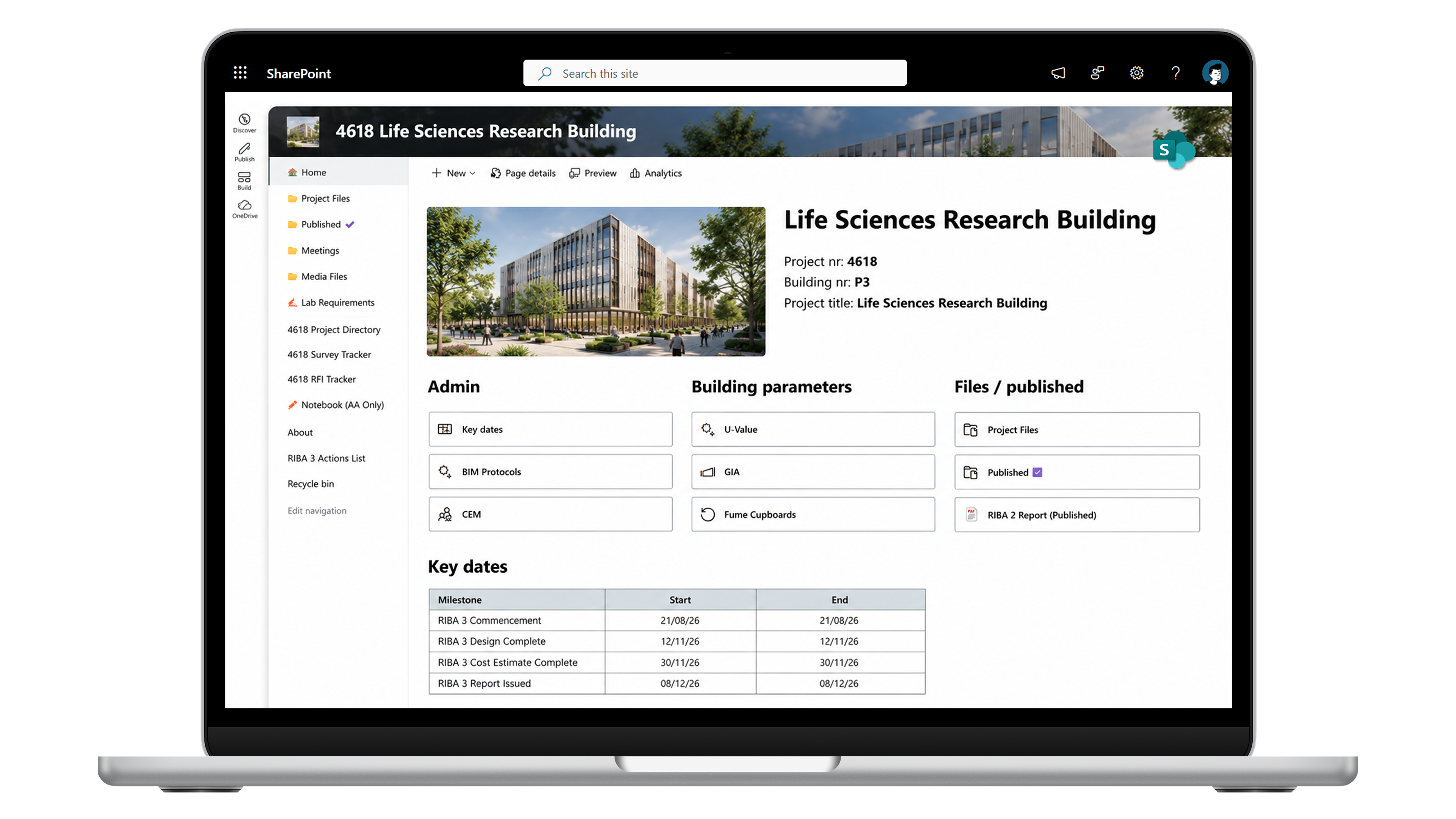
Project SharePoint (or SharePoint site - projects specific) is best suited for collaboration during pre-contract design development stages, set up a project-specific site with dedicated document libraries and use the built-in features: a small landing page for key project information and a project directory built on a SharePoint list.
It costs nothing beyond the setup (*if you have an M365 Business Basic or above licence). Most people across the industry already have Microsoft 365 licences, so inviting additional users is simple. As an example, one architectural practice we work with using more than 30 project-dedicated SharePoint sites in the past few years or so, and they added real value.
The biggest advantage is live collaborative documents: Word, PowerPoint, Excel and so on. That is exactly what you need during dynamic design development, roughly RIBA Stages 1 to 4.
The drawback is that there is no proper QA procedure for document control and no established workflow built in. It is a messier environment, and you live with that. At these stages it is usually the right trade.
Option 3: 3rd party purpose-built CDE platforms
My verdict: at early stages, usually the wrong tool.
Because they are purpose-built, these platforms come with thorough audit trails, QA procedures, and review and approval workflows. They are designed to align with the rigid ISO standards. On one hand, that is great. But it really serves the techincal design (RIBA 4), construction (RIBA 5) and handover (RIBA 6) stages. These platforms are typically not suitable for early design coordination.
The other catch is that most architectural practices do not have these platforms in place, so for them it is not really an option. They are typically used by major contractors, or by clients who want their own CDE.
The exception could be Autodesk Forma Data Management. But it is so expensive and complex to set up and use that it fails as a collaborative early stage design platform. Forma is very much focused on collaborative BIM processes between the core design disciplines.
What this misses is how many people are involved. On a large project you can have 50 plus stakeholders. Add client stakeholders with short engagement on top of that, and you cannot realistically get everyone in one place on these platforms. Project stakeholders such as the PM, or designers such as acousticians, end up with no access.
For Forma or other similar-cost platforms, this is where it falls apart. A large portion of your design team has nothing to do with models or principal drawing production. Do you buy them all a licence, or do you leave them without access? The same question applies to the client representative and client stakeholders. Either way, you lose.
We asked Autodesk Forma sales how we could use it on a project with unlimited licences. They quoted around £20k annually. If the project runs for 5 years, that is £100k.
Final Thoughts
Hopefully this article helps explain a CDE from a practical point of view: who runs it, what it is for, and which platform fits the stage you are actually in.
If you need technical assistance setting one up, get in touch.