Weekly timesheets application with Power Apps
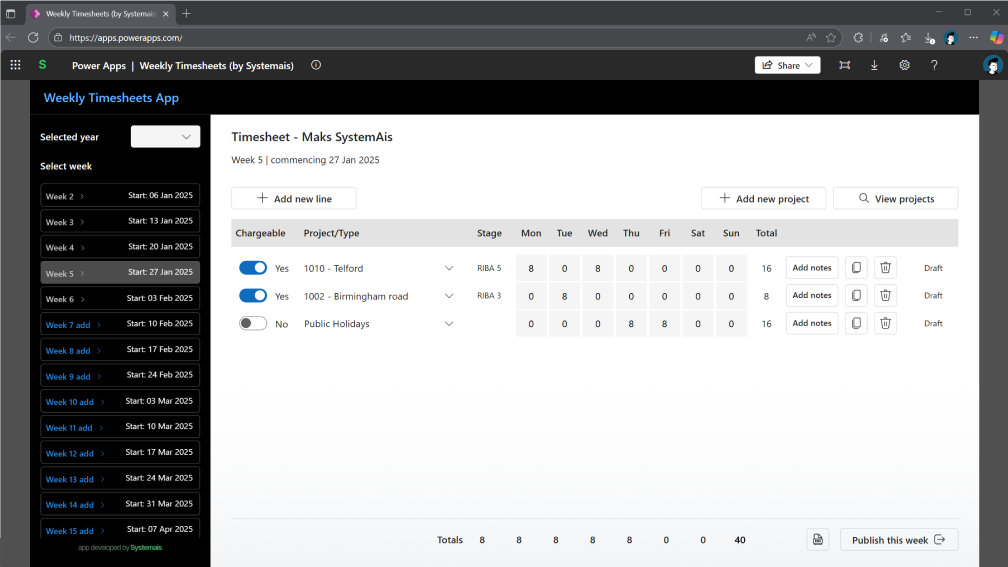
Streamline time tracking for your team with this M365 Power App solution. Track weekly hours, projects, and tasks efficiently with an intuitive interface designed for field and office workers alike.
The problem
Time tracking remains a challenge for many businesses. Whether you are managing field workers, office staff, or hybrid teams, capturing accurate time data for projects, clients, and tasks can be time-consuming and error-prone.
Many organisations struggle with:
- Paper-based timesheets that are difficult to track and consolidate
- Complex time tracking software with steep learning curves
- Expensive subscription-based solutions that exceed budget constraints
- Generic tools that don not fit specific business workflows
- Delayed timesheet submissions affecting payroll and project costing
The solution
We have developed Timesheets Power App that integrates seamlessly with your Microsoft 365 environment. This solution provides a user-friendly interface for employees to log their time weekly, with all data securely stored in SharePoint.
Key solution components
Microsoft 365 Licence Requirement: Requires Microsoft 365 licence with SharePoint and Power Apps (most likely already part of your subscription if you are an M365 user).
SharePoint List - Data Storage:
- Hosted on your SharePoint site where all timesheet data is saved ✔️
- List is easy to set up and access for bulk edits and adjustments to your requirements ✔️
- Free and included under your SharePoint licence ✔️
- Not a true database, but according to some sources can store up to 1 million records ❗
- Limitation: does not have advanced built-in access settings ❗
Power App - User Interface:
- Intuitive front-end interface for employees to submit timesheets ✔️
- Mobile-friendly design for on-the-go entry ✔️
- Seamless integration with SharePoint data storage ✔️
Get the app
Our intention was to develop an app that any user could self-install. However, during our testing phase, we discovered that the self-deployment process presents significant challenges with Microsoft 365's import system. These technical barriers would make it difficult for users who have not previously worked with Power App Development or the M365 ecosystem to successfully deploy the app independently.
However, we have two straightforward options to get this app working for you:
- We install it for you - Our team can deploy the app directly into your Microsoft 365 environment, ensuring it is configured correctly and ready to use
- Receive the importable file - If you feel like you can install it yourself, we can share the licence-free importable Power App file directly with you, along with guided support for the import process
Contact us to discuss which option works best for your organisation.
Requirements
To use this Power App, you will need:
- Microsoft 365 Business Standard or higher (includes Power Apps)
- Sharepoint Online access as administrator to setup Sharepoint site
- Power Apps environment with maker permissions for installation
- Basic familiarity with Power Apps (or willingness to learn!)
Support and customisation
Need help with installation or want to customise the app for your specific requirements? We offer:
- Installation support
- Custom feature development
- Integration with existing systems
- Ongoing maintenance and updates
This Power App is developed by Systemais, combining practical business needs with efficient Microsoft 365 solutions. We create tools that work the way you work.
Disclaimer & Usage Terms
This Power App is provided free of charge and royalty-free for your use. You are free to use, modify, and implement it as you see fit for your organisation.
Important: This app is provided "as is" without warranty of any kind. Use at your own discretion and risk. Systemais accepts no legal responsibility or liability for:
- Data accuracy or integrity
- Business decisions made based on app data
- Any losses or damages arising from use or misuse of the app
- Compatibility with your specific systems or workflows
You are solely responsible for testing, validating, and ensuring the app meets your requirements before deploying it in your organization.